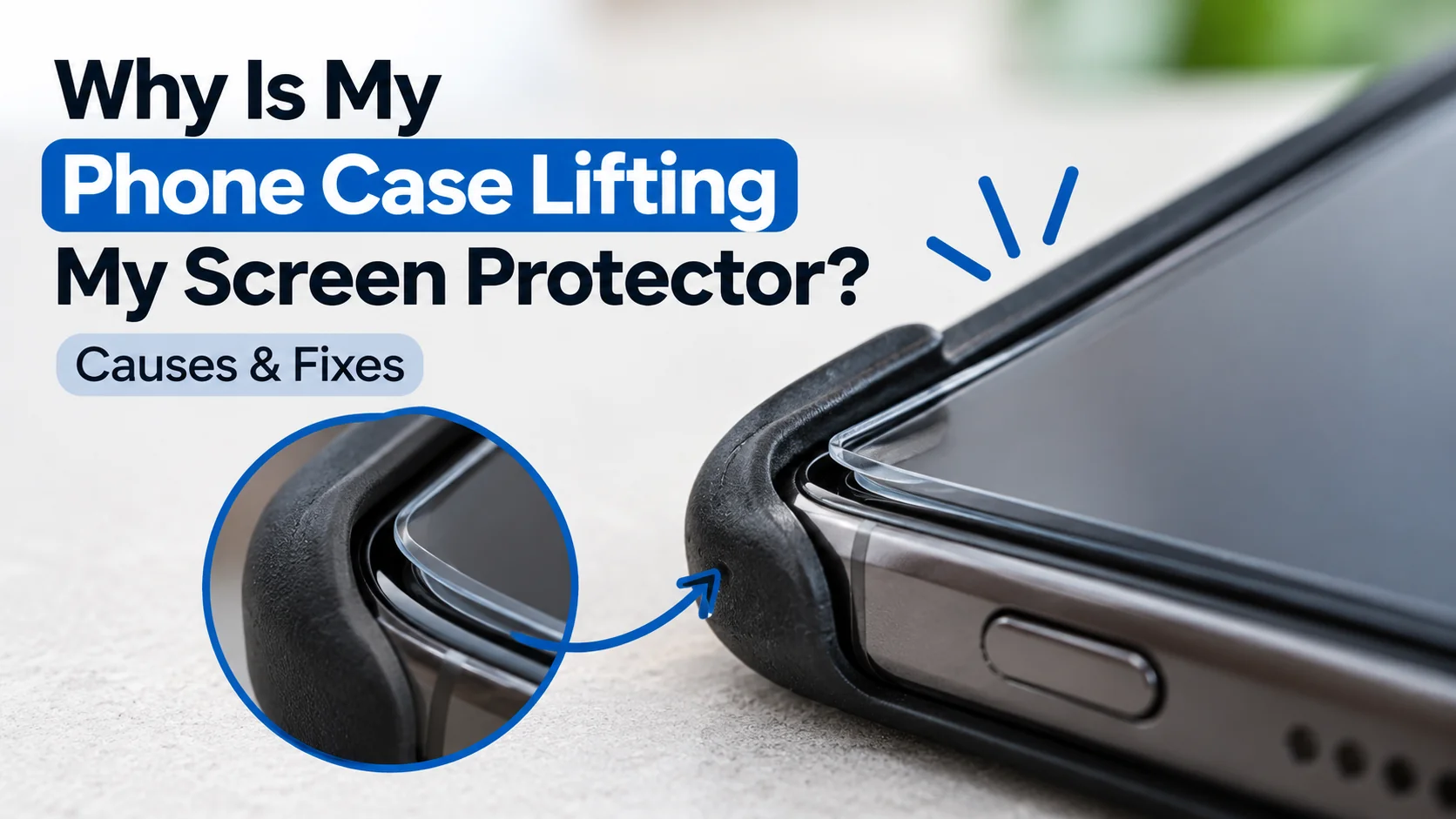
You put on a fresh screen protector, slide your phone into its case, and a few days later a corner has lifted. It is one of the most common phone accessory problems, and it is usually fixable. In most cases, the case is pressing on the edge of the protector, the protector is slightly too large, or dust got trapped under it. This guide helps you work out which one it is, fix it, and stop it from happening again.
How to Check If Your Phone Case Is Lifting Your Screen Protector
Before you replace anything, confirm the case is the cause. A few quick checks will tell you.
Remove the Case and Check the Screen Protector Edges
Take the case off and look at the protector under good light. Tilt the phone so you can see the edges. If the lifted area sits flat on its own, or looks smaller once the case is off, the case was the likely cause. If the edge is still raised with the case removed, the problem is probably the installation.
Look for Pressure Between the Case and Screen Protector
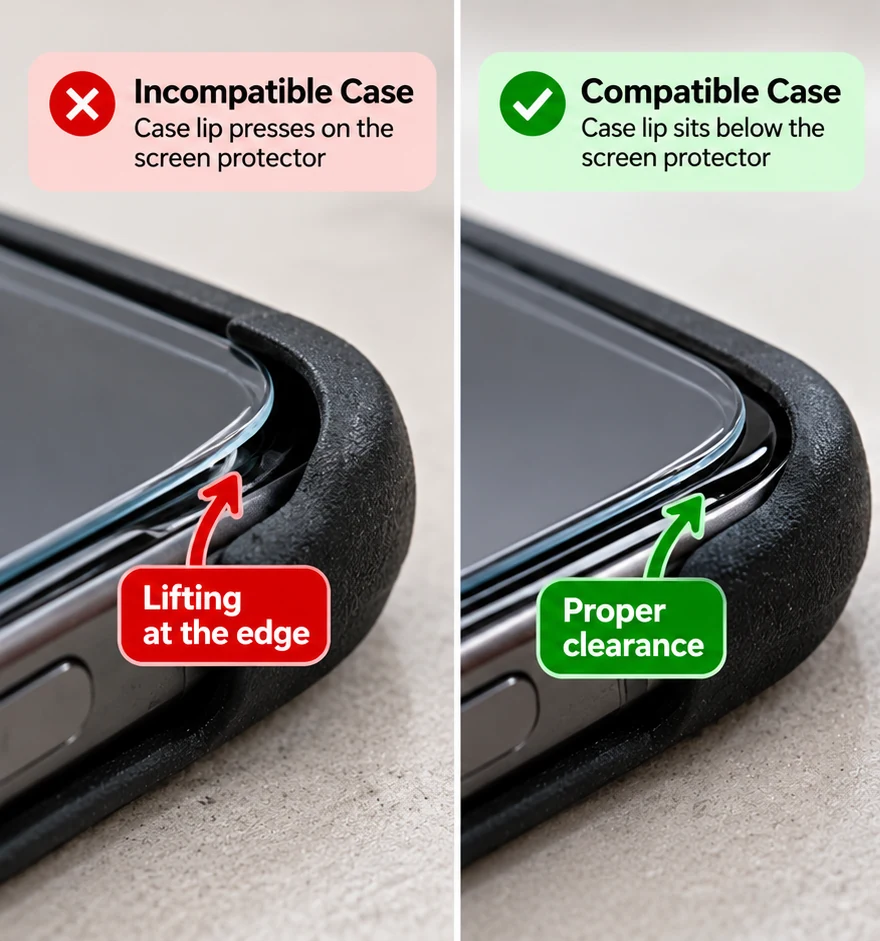
Look at the inside lip of your case, the raised edge that wraps around the screen. If it sits directly on top of the protector instead of beside it, it presses on the edge every time you pull the phone in and out of a pocket. Look for faint marks or rub lines on the case lip, and check for a gap that has opened right where the case touches.
Check Whether the Same Edge Keeps Lifting
Pay attention to where the lifting happens. If it is always the same corner or the same side, something is pushing on that spot, whether a tight case lip, a misaligned protector or a spot of dust. Lifting that appears randomly around the screen points more towards weak adhesive or a dirty surface.
How to Fix a Screen Protector That Keeps Lifting
If the protector is intact, you can often fix a lifted edge in a few minutes. Go slowly, because forcing a lifted protector down can trap air or crack tempered glass also , check the manufacturer’s instructions and seek authorized service rather than attempting to peel it off yourself.
Remove the Phone Case and Inspect the Lifted Edge
Start with the case off and the phone powered down. Check the lifted area for dust, lint, hair or a visible crack. A clean, undamaged protector with a small lifted corner can usually be saved. A protector with cracks or chips running to the edge should be replaced instead.
Clean Dust and Debris From the Edges Safely
Lift the edge gently, using a fingernail or a thin plastic card, never a metal blade that could scratch the screen. Remove any dust with the sticky side of a piece of tape or a dust-removal sticker. Wipe the exposed screen with a microfibre cloth, and avoid soaking the area, since liquid can seep under the protector and into the phone.
Reapply the Screen Protector if Possible
Some protectors can be gently reseated, but others are designed for a single installation. If the adhesive has lost its grip, replacing the protector is usually more reliable than repeatedly removing and reapplying it.
Check the Fit Before Putting the Phone Case Back On
Let the protector settle for a while before refitting the case. Then check that the protector sits clear of the case lip. Put the case on slowly and watch the edges as you do. If the protector shifts or lifts as the case slides on, the two are not compatible.
Why Does a Phone Case Cause Screen Protector Lifting?
Most lifting comes down to a handful of causes. Knowing which one applies stops you repeating the same mistake with the next protector.
Raised Case Edges Putting Pressure on the Screen Protector
Many cases have a raised lip to keep the screen off the table when the phone is face down. If that lip sits too close to the edge of the screen, or the protector extends too far, the case pushes against the protector and slowly peels it up. Thick, rugged cases with tight lips are the most likely culprits.
Incorrect Screen Protector Size or Alignment
A protector that is slightly too large or installed off-centre leaves one edge closer to the case than the others. Even a small misalignment can be enough. A protector built for a different model, even a similar one, will often lift sooner.
Curved Screens and Case Compatibility Issues
Phones with curved or sloping screen edges are harder to protect. A flat protector has to follow the curve, and the edges can lift if the case squeezes that area. Case-friendly protectors that stop slightly short of the edge are often a better match for these phones.
Dust, Dirt, or Weak Adhesion Under the Protector
Sometimes the case is only the trigger. A speck of dust under the edge stops the adhesive bonding, and the case simply gives it the push it needs. Skin oils, cleaning residue and a worn adhesive layer can all weaken the bond too.
When Should You Replace a Lifting Screen Protector?
Reapplying works only if the protector is still in good shape. Past a certain point, replacing it is the safer choice for both your screen and your time.
Signs Your Screen Protector Cannot Be Reused
- The glass is cracked, chipped or shattered at the edge
- The adhesive no longer holds, even after cleaning
- The protector is bent, creased or warped
- Dust or bubbles keep returning in the same area
- Lifting is spreading from the edge towards the middle of the screen
When Replacing the Protector Is Better Than Reapplying It
If you have already reapplied once and the edge lifts again, replace it. The same goes for a protector that is damaged, or one that was the wrong size from the start. A new protector costs far less than a repaired or replaced screen, and a lifted, cracked protector no longer protects the way it should.
How to Prevent Your Screen Protector From Lifting Again
A few simple habits keep new protectors flat for much longer.
Check Phone Case and Screen Protector Compatibility
When choosing phone cases and screen protectors, make sure both are designed for your exact phone model and work together. Look at how close the case lip comes to the screen, and choose a protector that leaves a small margin around the edge.
Install and Align the Screen Protector Correctly
Clean the screen thoroughly, remove every speck of dust, and use the alignment tray or guide if one is included. Lower the protector slowly and press from the centre outward. A careful install in a dust-free spot, such as a steamy bathroom after a shower, makes a real difference.
Follow the Manufacturer’s Installation Instructions
Every protector is slightly different. Some need a settling period before you add a case, and some ask you to avoid pressing the edges for a while. Follow the instructions in the box, because they were written for that exact product.
How to Choose a Case-Friendly Screen Protector
The best way to avoid lifting is to choose the right protector in the first place.
Check Your Phone Model and Case Compatibility
Confirm the exact model, not just the family. An iPhone 15 and an iPhone 15 Pro, for example, are different sizes. If you already own a case, bring it along when you buy a protector, so you can check the fit before you commit.
Choose the Right Screen Protector Size and Edge Coverage
Protectors come in full-coverage and case-friendly styles. Full-coverage versions reach the very edge of the screen and look neat, but they can clash with tight case lips. Case-friendly versions stop a little short of the edge, which leaves room for the case. If you use a thick case, the case-friendly option is usually the safer pick.
Frequently Asked Questions
Can a Tight Phone Case Damage a Screen Protector?
Yes. A tight case with a high lip can press on the protector’s edges, lift them over time and, with tempered glass, sometimes chip the edge. If the case is hard to fit over the protector, the two are probably not a good match.
Will a Screen Protector Stick Again After Lifting?
Sometimes. If the protector is clean, undamaged and the adhesive is still tacky, a gentle reapplication can work. If dust has gotten under it or the adhesive has weakened, it will probably keep lifting and should be replaced.
Why Does My Screen Protector Keep Lifting at the Corners?
Corners take the most stress. They are where the case lip, pocket friction and misalignment all meet. Repeated lifting at the corners usually means the protector is slightly oversized, the case is pressing there, or dust sat in that spot during installation.
Can I Use Any Phone Case With a Tempered Glass Screen Protector?
Not always. Most cases work with most protectors, but fit varies by brand and style. Thick cases with raised lips are the most likely to cause trouble, so check both are made for your exact model and choose a case-friendly protector if in doubt.
Should I Remove My Phone Case When Installing a Screen Protector?
It depends on the screen protector. Most protectors that use an alignment tray require you to remove the case first. However, some manufacturers recommend keeping the case on to help position the protector correctly. Follow the instructions included with your protector, then check that its edges do not touch the case lip.
Still having trouble with a lifting screen protector, or not sure which one suits your phone and case? Contact CA Mart or visit our stores in Welland or St. Catharines, and we’ll help you find the right fit.