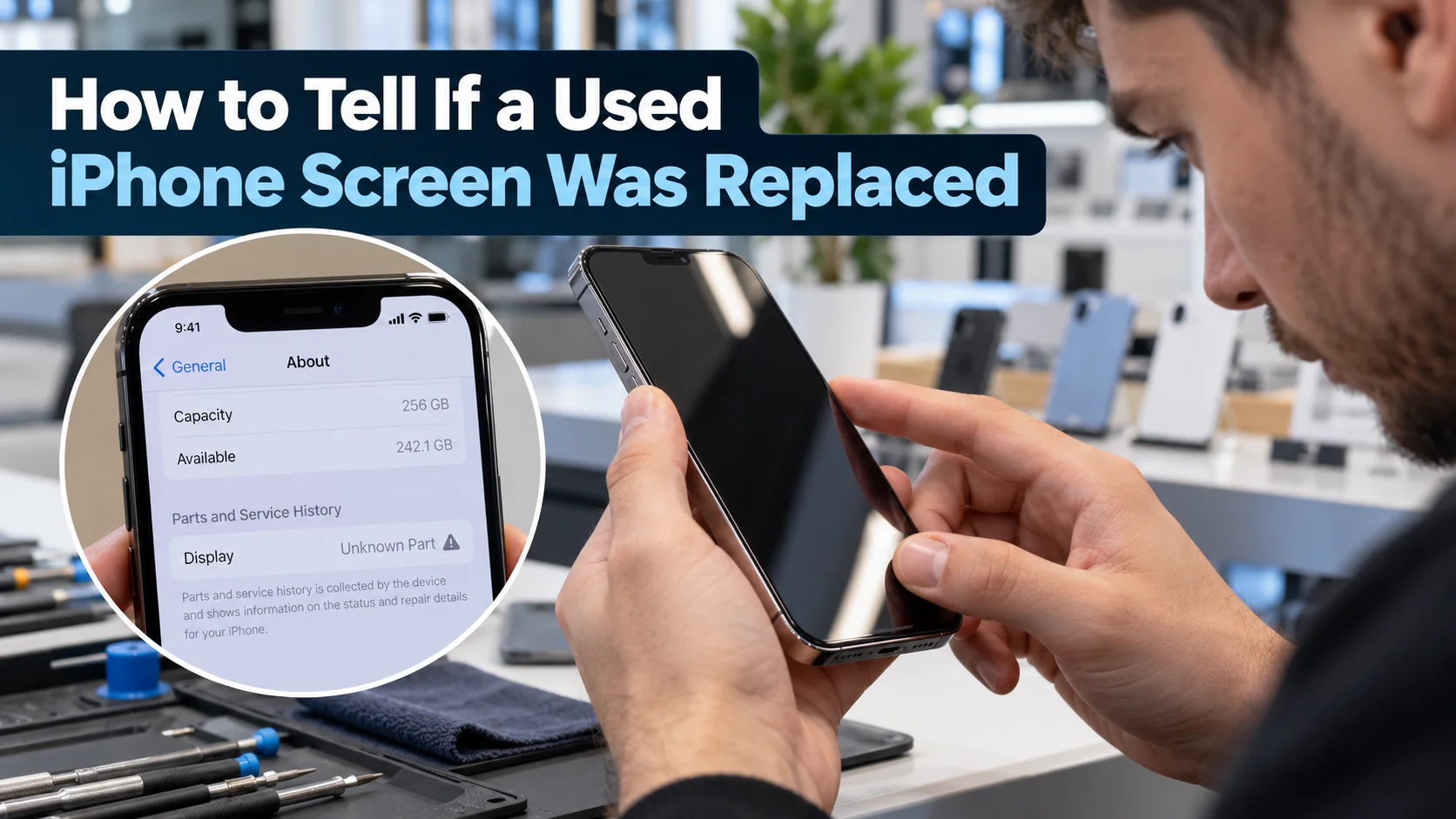
A used iPhone can be a great deal, but the screen is one of the parts most often repaired. To identify start by checking Settings → General → About → Parts and Service History. On supported models, this can show whether the display has been repaired and whether Apple recognizes the replacement part. If no screen history appears, check True Tone, brightness, touch sensitivity, and screen edges for signs of replacement.
A professional iPhone screen replacement isn’t necessarily a problem. What matters is the quality of the replacement, how well the screen works, and whether the asking price reflects its condition. This guide explains how to identify a replaced iPhone screen before buying.
How to Check iPhone Screen Replacement History in Settings
On supported models, your iPhone keeps a record of certain repairs. It takes less than a minute to read, so make it your first check on any used phone.
How to Find Parts and Service History on an iPhone
Open Settings, tap General, then About, and scroll down to Parts and Service History. The feature needs iOS 15.2 or later, so update the phone first if it is on an older version. If the section is missing, the phone either has no repair record to show or is a model that does not support it. Always check this on the phone itself, since a screenshot is easy to fake.
What Do Genuine, Used, Unknown, and Finished Repair Mean?
Each label tells you something different about a part:
- Genuine means the repair used genuine Apple parts and processes.
- Used means the part was already installed in another iPhone before this one.
- Unknown means the part is not genuine, has not been verified and linked to the phone, is not working as expected, or has been modified.
- Finish Repair means the repair was started but not completed in Apple’s Repair Assistant. Until it is, Face ID or Touch ID may not work.
An Unknown or unfinished label on a display does not always mean the screen is poor quality, but it does mean you should ask the seller exactly what was done.
Which iPhone Models Show Screen Replacement History?
Support varies by model. iPhone 12 models and later show history for the display, battery, logic board and cameras. iPhone 11 models show the display and battery. The iPhone XR, XS, XS Max and SE (2nd and 3rd generation) show battery history only, so there is no screen record on those. Apple also shows only the most recent service on a part, so an earlier repair can be hidden by a later one.
How to Tell If an iPhone Screen Was Replaced Without Service History
If the phone is an older model, or the history section tells you nothing, you can still check the screen by hand. No single test proves anything, so use several together.
Check if True Tone Is Available
True Tone adjusts the screen’s colour to your surroundings. Open Control Center, press and hold the brightness slider, and look for the True Tone button, or check Settings, then Display & Brightness. On many iPhones, a replacement screen that is not original can make this option disappear. Treat a missing True Tone as a warning sign rather than proof, since it depends on the model and the part used, and a screen that keeps it is not automatically original.
Test Screen Brightness, Colours, and Touch Sensitivity
Turn the brightness all the way up and down, and view a plain white and then black image. Look for yellow or blue tints, dim patches, uneven lighting or a screen that is clearly dimmer than it should be. Then test the touch. Drag an icon around every edge and corner, type with the keyboard open, and draw a line with your finger. Dead spots, laggy response or touches that register in the wrong place can point to a poor-quality replacement.
Inspect Screen Edges and Signs of Previous Repair
Look closely at the gap between the screen and the frame. It should be even all the way round. A wider gap on one side, glue residue, a screen that sits slightly raised, or scratches near the edges can all suggest the phone has been opened. Check the screws at the bottom, near the charging port, for damaged or mismatched heads. Fingerprint marks under the glass or dust trapped inside are further signs.
Can an iPhone Screen Be Replaced Without Showing in Settings?
Yes. There are several ways a replaced screen can go unnoticed in Settings. The model may not support display history, as with the iPhone XR, XS and SE models. The phone may be on iOS older than 15.2. A screen replaced with a genuine Apple part and properly completed will show as Genuine, so it appears in the record without looking like a problem. And only the latest service on a part is shown.
This is why you should never rely on Settings alone. Combine it with a physical inspection, the tests above, and a direct question to the seller.
Is It Okay to Buy a Used iPhone With a Replaced Screen?
It can be, as long as the replacement was done well and the price is fair. A good screen replacement can leave a phone working perfectly, and plenty of reliable phones have had one. A poor one can cause dim or discoloured displays, touch problems and shorter durability.
Ask the seller who did the repair, what part was used and whether any warranty came with it. Ask for receipts if they exist. If the answer is vague, or the screen shows problems in your tests, walk away or negotiate a lower price. Buying from a business that tests its phones and gives a warranty reduces the risk a great deal.
Checklist: What to Check Before Buying a Used iPhone
- Check Parts and Service History in Settings, General, About
- Confirm iOS is up to date and the phone is not locked to someone else’s Apple account
- Test True Tone, brightness and colours
- Test touch response across the whole screen
- Check the screen edges, gaps and screws
- Check Battery Health in Settings, Battery
- Try the cameras, speakers, microphone and charging port
- Check Face ID or Touch ID
- Ask about previous repairs and whether there is a warranty
- Get a receipt with the model and serial number
Frequently Asked Questions
How Do I Know if My iPhone Screen Is Original?
Check Settings, General, About, then Parts and Service History. On supported models, a display with no repair message is most likely original, and one marked Genuine was repaired with a genuine Apple part. If your model does not show display history, rely on the physical checks above, or ask a repair shop to inspect it.
Does an Unknown Part Message Mean the iPhone Screen Is Fake?
Not necessarily. Unknown means Apple could not verify the part. The part may be non-genuine, but it can also mean the repair was not finished correctly, or that the part is not working as expected. It tells you to investigate, not that the screen is counterfeit.
Does a Replaced Screen Affect an iPhone’s Value?
It can. An unknown part may reduce trade-in value, and many buyers pay less for a phone with a replaced display. A properly done genuine repair affects value far less. Either way, expect a replaced screen to lower the asking price a little, and use it as a point to negotiate.
Want to buy a used iPhone with confidence, or have a screen you would like checked? Contact us or visit CA Mart in Welland or St. Catharines.